Entry and exit algorithms
The EA uses specific rules for opening trades and managing exits. It evaluates the position sequence instead of treating automation as a single entry signal.
EXPERT ADVISOR FOR METATRADER 4
Pair-specific automated trading for EURJPY, supported by a direct Strategy Tester report, public FX Blue monitoring and lifetime license options. Review the evidence and test the EA on demo before risking live capital.
ABOUT LUCKY PIPS
Lucky Pips combines rule-based automation, programmed position management, verifiable evidence and lifetime access. Every edition retains its own pair, timeframe, Backtest and live monitoring profile.
The EA uses specific rules for opening trades and managing exits. It evaluates the position sequence instead of treating automation as a single entry signal.
Programmed rules can analyse conditions, place orders and manage positions without requiring an emotional decision at every price movement.
This page links to the dedicated EURJPY FX Blue profile and the direct official Strategy Tester report rather than a generic home page.
Lucky Pips EURJPY 2.0 combines automated grid management with selected indicators to analyse EURJPY. The EA distributes trades across price levels when its rules are satisfied and manages positions through a configuration dedicated to the four-hour chart.
The euro-yen relationship can behave differently from USD-based pairs. This edition therefore keeps its own EURJPY H4 parameters, historical report, monitoring profile, product prices and activation links.
The robot executes only the logic for which it was programmed: it evaluates available conditions, enters when the rules are satisfied, manages exposure and applies its exit process. Automation can improve consistency, but it cannot remove market risk or make an outcome predictable. Spread, latency, price data, leverage and broker execution continue to influence results.
USDJPY, AUDUSD and EURJPY are not interchangeable labels. Each has a different chart period, report, monitoring profile, price and purchase option. This separation helps buyers verify that the technical evidence and license they select belong to the exact EA they intend to use.
Before purchasing, compare the family, open the monitoring and Backtest independently, read the account limits and confirm that MetaTrader 4 is supported by your broker. Support is available for reasonable questions about activation, installation and basic setup.
PRODUCT FAMILY
Choose the page that matches your intended pair and timeframe. Each edition keeps separate technical evidence and purchase options.

M30 · version 2.0

H1 · version 2.0

H4 · version 2.0
TRADING STRATEGY
Lucky Pips combines market analysis, order execution and position management inside MetaTrader 4. The EA waits for specific conditions, opens positions only when its rules are met and manages the sequence without requiring the trader to monitor every tick manually.
H4 provides a slower analytical rhythm than USDJPY M30 and AUDUSD H1. Signals may be less frequent, while individual market movements can cover a wider range. Lucky Pips EURJPY uses parameters prepared for this timeframe and should not be attached to another pair or chart period without specific instructions from support.
A grid strategy may maintain more than one position at the same time. The combined exposure is therefore more important than the result of a single trade. Lucky Pips manages the sequence according to its algorithm, while the user remains responsible for selecting a prudent lot size, maintaining sufficient free margin and monitoring the account.
Fast volatility, gaps, widening spreads and slippage can change the price at which an order is filled. Symbol suffixes, commission, GMT settings and leverage may also produce differences between accounts. Test the EA with the same broker and account type you expect to use live, and confirm that the EURJPY symbol is recognised correctly.
Automated trading can apply rules consistently and reduce emotional intervention, but the platform and account should still be checked. Review the Experts and Journal tabs, keep AutoTrading enabled, confirm that EURJPY remains open on H4 and make sure the terminal has a stable connection.
PUBLIC MONITORING
Open the public FX Blue profile to review the statistics, account history and information made available by the monitoring service. A connected history is more useful than an isolated screenshot, but it is still not a promise of future performance.
Review the length of the history, drawdown, trading frequency and changes in balance and equity. A positive return alone does not describe risk. Monitoring can also be affected by the account configuration, deposits, withdrawals or changes in market conditions.
Compare the public profile only with this EURJPY edition. Results from another Lucky Pips pair do not automatically describe the behaviour of EURJPY H4.
OFFICIAL STRATEGY TESTER
The report corresponds to EURJPY on H4. Historical simulation can differ from live trading because of data quality, spread, slippage, leverage and broker execution.
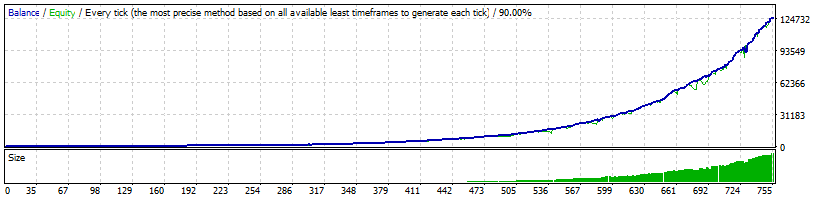
The button opens the exact Strategy Tester HTML file for this EA. It does not redirect to the website home page or to the report of another currency pair.
EA: Lucky Pips EURJPY 2.0
Pair: EURJPY
Timeframe: H4
Backtesting estimates how a strategy would have responded to historical data. It can help study trade frequency, profit and loss distribution, drawdown, Profit Factor and other statistics. It does not guarantee a similar future result and should not be analysed in isolation.
Two brokers can produce different results because their price feeds, spreads, trading hours, commission and execution differ. Tests can also change when the historical data, modelling method or EA settings are not identical.
Lot size and leverage materially affect risk. A larger lot may make a historical test appear more profitable while also increasing drawdown and the possibility of a significant loss. Review the full report, not only the final net profit.
LICENSE, DELIVERY AND SUPPORT
Activation is prepared for the MT4 account number supplied. Business covers one real and one demo account; Standard covers two real and two demo accounts.
After payment, send the requested account information to support. The EA/EX4 file and activation confirmation are delivered electronically.
Published packages include free updates and support for reasonable installation, activation and basic operation questions.
The license remains active during the life of the product for the accounts included in the selected package. Because activation is linked to an MT4 account number, changing account or broker may require a new licensed file. Contact support before making the change.
The EA may not be resold, redistributed, published, shared, modified or decompiled. The purchase authorises personal use within the limits of the selected package. Keep the order email and activation details secure.
You need MetaTrader 4, a connected terminal, automated trading permission and a EURJPY chart on H4. Check broker symbol suffixes and use one EA per pair per terminal to reduce conflicts between settings or Magic Numbers.
LIFETIME LICENSES
Every offer shows the one-time price, account allowance and license scope before the payment button. Choose the account allowance that matches your needs.
one-time payment · lifetime license
The package includes this Lucky Pips edition for the stated number of accounts. The license remains active for the life of the product and is linked to the MT4 account number supplied for activation.
one-time payment · lifetime license
The package includes this Lucky Pips edition for the stated number of accounts. The license remains active for the life of the product and is linked to the MT4 account number supplied for activation.
THREE-EA OFFER
The bundle includes all three Lucky Pips editions at a discount of at least 30% compared with purchasing them separately. The stated activation allowance applies to every EA included.
one-time payment · lifetime license
The package includes all three USDJPY, AUDUSD and EURJPY editions for the stated number of accounts. The license remains active for the life of the product and is linked to the MT4 account number supplied for activation.
one-time payment · lifetime license
The package includes all three USDJPY, AUDUSD and EURJPY editions for the stated number of accounts. The license remains active for the life of the product and is linked to the MT4 account number supplied for activation.
RESPONSIBLE USE
Do not risk money you cannot afford to lose. An EA automates rules but cannot remove Forex risk, the risks associated with leverage or the possibility of a losing trade sequence.
The published baseline is at least $200 for 0.01 lots. Treat this as an operating reference, not a guarantee of safety or profit.
Verify the installation, permissions, spread, schedule and behaviour on a demo account before considering live capital.
Use reasonable risk. Avoid a configuration that could materially damage the account during one loss or an extended trade sequence. Consider free margin and the combined exposure of every open order.
Maintain sufficient capital. The $200 per 0.01 lot reference can become insufficient when spread, leverage, volatility or broker margin requirements are unfavourable. Reducing the lot size generally reduces exposure but cannot prevent all losses.
Test the exact edition. Use EURJPY on H4 with conditions similar to the planned live account. If trading frequency or execution differs from expectations, investigate the cause before using real money.
The operator remains responsible for activating the EA, choosing the lot size and supervising the account. Retain access to the terminal so that technical problems can be identified and handled promptly.
MT4 INSTALLATION
Complete every step and perform the first verification on demo. Do not substitute another pair or timeframe for this edition.
Use the EA/EX4 file supplied after purchase and activation. Keep a secure backup and avoid modified copies from third parties.
In MetaTrader 4 select File → Open Data Folder. This opens the correct terminal location even when MT4 was installed in a custom path.
Open MQL4 → Experts and copy the EA file there. Place presets or additional files only in the locations specified by the instructions.
Restart the platform or refresh the Navigator panel. Lucky Pips should appear under Expert Advisors.
Open Tools → Options → Expert Advisors, enable the required permissions and make sure the AutoTrading button is active.
Open EURJPY on H4, drag the EA from Navigator and review the lot size and inputs before confirming.
Check Experts and Journal for license, permission or connection errors. Keep MT4 and the Internet connection running while the EA is expected to trade.
Confirm that the automated-trading icon is enabled, that Journal shows no errors and that the license recognises the account number. The EA does not need to open a trade immediately; it must wait for its programmed market conditions.
If MT4 closes or loses its connection, the EA cannot perform new actions until the terminal is running again. A compatible VPS may be used for continuous operation, but its security, configuration and maintenance remain the user's responsibility.
FREQUENTLY ASKED QUESTIONS
Yes. The direct Strategy Tester report identifies EURJPY and the 4 Hours (H4) period.
It shares the automated family approach, but it uses separate EURJPY H4 parameters, evidence and purchase products.
No. They provide connected and historical evidence, but neither can predict or guarantee future trading results.
No. The published packages include lifetime use for the stated number of real and demo accounts during the life of the product.
Yes. Install it on demo first, verify the pair, timeframe, permissions, spread and broker execution, and use only risk you can afford.
You receive the EA/EX4 file, installation guidance and activation for the MT4 account numbers included in your selected package.
The license is linked to the account number supplied. Contact support before changing broker or account so the activation requirements can be reviewed.
No. Historical data, modelling, spread, slippage, leverage and broker execution can all produce a different live outcome.
LUCKY PIPS SUPPORT
Contact us about product selection, installation, license activation or basic EA setup. Never send a trading password.
Phone: +48 61 867 35 80